Stuck at 8-10 clicks per second while opponents crush you in Minecraft PvP with their 18-20 CPS? Butterfly Clicking is the technique that will revolutionize your gameplay. Used by top Bedwars and Skywars players and Bridging speedrunners, this two-finger alternating method reaches dizzying click speeds — up to 20 CPS and beyond — while maintaining remarkable aim control.
In this complete guide, we'll break down the technique step by step, reveal the hardware settings pros don't share, and provide a concrete training program to go from beginner to expert in a few weeks. Ready to dominate your opponents? Let's begin.
What exactly is Butterfly Clicking?
Butterfly Clicking is an advanced clicking technique where you place two fingers — index and middle — on the same mouse button, then alternate them at very high frequency. The movement resembles the beating of a butterfly's wings, hence the name.
Unlike Jitter Clicking which relies on muscle tension from a single finger (causing fatigue within minutes), Butterfly Clicking distributes the effort between two fingers. Result: less fatigue, more speed. An average Jitter clicker reaches 10-14 CPS. A good Butterfly Clicker reaches 15-20+ CPS with far greater consistency.
The secret of mechanical Double Clicking
What makes Butterfly Clicking even more formidable is the double-clicking phenomenon. When your fingers alternate rapidly, the physical bounce of the mouse switch can register 2 signals for a single press. It's not a bug — it's a natural mechanical behavior of Omron and Kailh switches that experienced players exploit fully.
By combining rapid two-finger alternation AND mechanical double-clicking, you literally multiply your CPS. This is how records exceed 25 CPS on 10-second sessions. Test your potential on our Butterfly Click Test right now.
Tutorial: Master Butterfly Clicking in 4 Steps
Step 1 — Optimal finger positioning
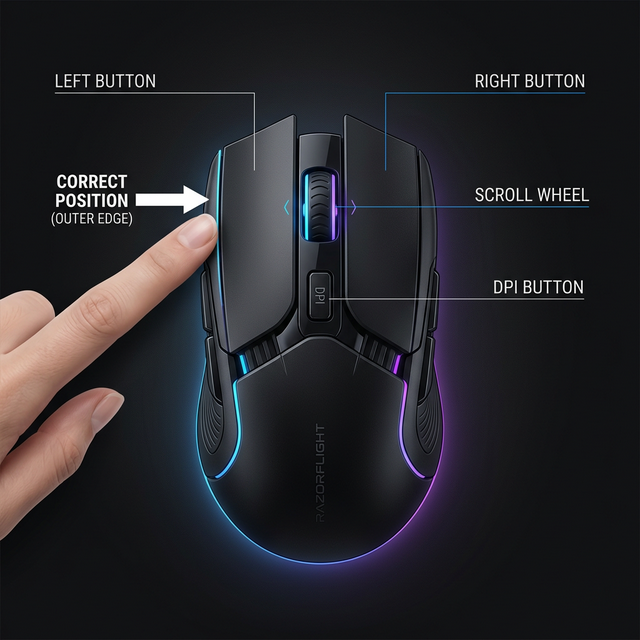
Finger position is the most important variable. Place your index and middle fingers side by side on the outer edge of the left mouse button. Why the edge? Because that's where leverage is maximized: each press requires less force and the switch bounce is amplified.
Your thumb and ring finger should stabilize the mouse on the sides. Your pinky rests naturally on the mousepad. This grip (a modified "Claw Grip") is essential: if the mouse moves during alternation, you'll lose precision and consistency.
Step 2 — Finding the natural rhythm
Never try to start at full speed. Butterfly Clicking works like a piano trill: start slowly (6-8 CPS), then gradually accelerate once the motion becomes automatic. The goal is to reach a fluid rhythm where fingers relay without conscious thought.
Pro tip: Use an online metronome set at 120 BPM (2 beats/second ≈ about 12 CPS with double-clicking). Increase by 10 BPM each week. In 3-4 weeks, you'll naturally be at 160+ BPM, equaling 16-20 CPS.
Step 3 — Optimizing the mechanical bounce
Debounce time is the most critical setting. It's the delay in milliseconds during which the mouse ignores signals after a click (anti-bounce). The lower this delay, the more frequent double-clicking becomes:
- Debounce at 10ms (default): Rare double-clicking, 10-12 CPS max
- Debounce at 6ms: Occasional double-clicking, 14-16 CPS
- Debounce at 4ms: Frequent double-clicking, 18-20+ CPS
- Debounce at 2ms: Near-permanent double-clicking (risk of ghost clicks)
Adjust debounce time through your mouse software (Glorious Core, Razer Synapse, Roccat Swarm). The optimal value is 4ms: it's the sweet spot between performance and reliability.
Step 4 — The training program (4 weeks)
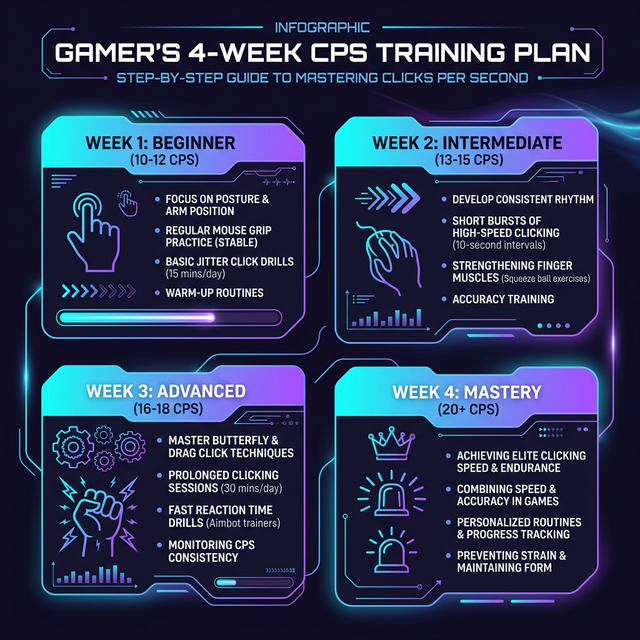
Here's the program followed by top PvP players to go from 8 CPS to 20 CPS:
| Week | CPS Goal | Duration/day | Exercise |
|---|---|---|---|
| Week 1 | 10-12 CPS | 10 min | Slow alternation on the Classic CPS Test (10s mode) |
| Week 2 | 13-15 CPS | 15 min | Gradual acceleration, focus on consistent rhythm |
| Week 3 | 16-18 CPS | 15 min | Reduce debounce to 4ms, Butterfly Click Test sessions (5s mode) |
| Week 4 | 18-20+ CPS | 10 min | Consistency maintenance, in-game integration (real PvP) |
Golden rule: Record your best score every day. Progress isn't linear — you'll have plateau days. That's normal. Muscle memory consolidates during sleep.
Essential hardware: mice and settings
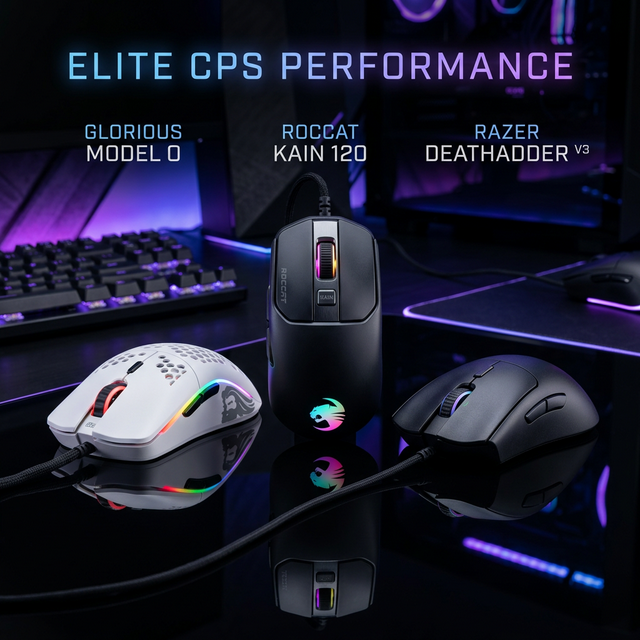
Not all mice are created equal for Butterfly Clicking. Here are the essential criteria and our recommendations:
| Mouse | Min. debounce | Switch type | CPS potential |
|---|---|---|---|
| Glorious Model O | 4ms | Omron (mechanical) | 20+ CPS |
| Roccat Kain 120 | ~6ms | Titan Click (mechanical) | 16-18 CPS |
| Razer DeathAdder V3 | ~5ms | Razer Gen-3 optical* | 14-16 CPS |
| SteelSeries Rival 3 | ~8ms | TTC (mechanical) | 12-14 CPS |
* Optical switches prevent mechanical double-clicking. The Razer DeathAdder V3 is ideal if you don't want double-clicks.
For a detailed hardware comparison, check our article Top 5 Best Mice for CPS.
Butterfly Click vs Jitter Click vs Drag Click: the comparison
| Criteria | Butterfly Click | Jitter Click | Drag Click |
|---|---|---|---|
| Average CPS | 15-20+ CPS | 10-14 CPS | 30-80+ CPS |
| Aim precision | Good | Average | Poor |
| Muscle fatigue | Low | High | Very low |
| Learning difficulty | Medium (2-3 wks) | Easy (few days) | Hard (special mouse) |
| Special mouse required | Recommended | No | Mandatory |
| Best for | Minecraft PvP, Bedwars | FPS, Kohi PvP | Godbridging Minecraft |
Our recommendation: If you're a beginner, start with Jitter Click (more intuitive). Once you consistently exceed 10 CPS, switch to Butterfly Clicking to break through the 15-20 CPS barrier. Drag Click is reserved for players with a compatible mouse (matte surface or grip tape) who focus exclusively on Bridging.
Health and prevention: play without injury
Butterfly Clicking is one of the least tiring techniques as it spreads the effort across two fingers (unlike Jitter which strains the entire forearm). However, here are essential best practices:
- Mandatory warm-up (2-3 min) — Stretch your fingers, wrists and forearms before each session. Open and close your hands 10 times, do wrist rotations.
- 20/20/20 rule — Every 20 minutes, take a 20-second break and look at an object 20 meters away.
- Short sessions — Limit intensive Butterfly Click training to 15 minutes max per session.
- Warning signs — If you feel tingling, numbness or pain in your fingers or wrist, stop immediately.
For more detailed prevention tips, check our comprehensive guide How to click faster without injury.
Frequently Asked Questions (FAQ)
Conclusion: take action now
Butterfly Clicking is the ideal technique for players who want to maximize their CPS while maintaining enough control to aim and fight effectively. With the right hardware (a mouse with 4ms debounce time), proper finger positioning (on the button edge) and regular training of 10-15 minutes daily, reaching 20 CPS is a perfectly realistic goal in 3-4 weeks.
Don't wait any longer to measure your current level. Head to our Butterfly Click Test to establish your baseline score, then follow this guide's training program to smash your records. You can also test your reflexes and aim precision to become a complete player. 🎯